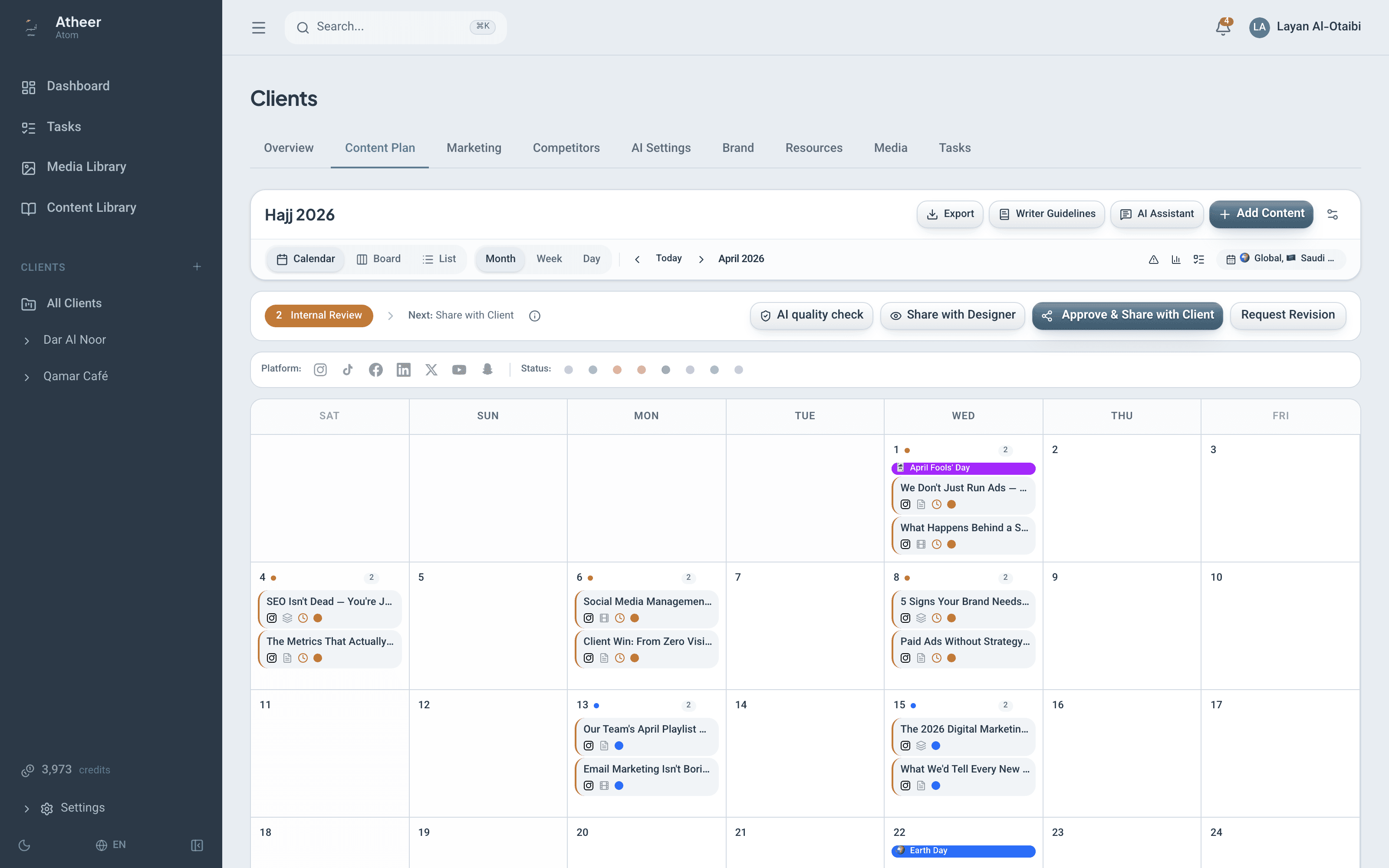
From first draft to final sign-off, without the chase
Atheer moves each month of content through seven owned stages — writing, supervisor review, design, and two client checkpoints — with gates that stop half-finished work and loops that route every rejection to the desk that fixes it.
No card needed. Accounts are activated after a quick review.
The seven stages
Each stage has an owner, a gate, and a way back
Work can only move forward when it is actually ready — and when a round comes back, it lands exactly where the fix belongs.
1
Writing
Content team
The team drafts every post — titles, copy, captions — inside the month’s plan.
Gate: Nothing moves to supervisor review until every item is complete. The platform lists exactly what is missing.
2
Supervisor review
Supervisor
A supervisor with approve permission reviews the whole round before the client ever sees it.
If it comes back: Returns to Writing — with a required note explaining why.
3
Client content review
ClientClient checkpoint 1
The client reviews the words on a share link. Media stays hidden, so the copy gets a clean read.
If it comes back: A rejection sends the round back to supervisor review.
4
Designing
Designers
Designers and external freelancers produce the visuals for every post that needs media.
Gate: Designing can’t end until every needs-media item has its files.
5
Design review
Supervisor
The supervisor checks the finished designs against the approved copy.
If it comes back: Returns to Designing.
6
Client design review
ClientClient checkpoint 2
The client sees the full posts — words and visuals together — and signs off post by post.
If it comes back: A rejection sends the design round back to Designing.
Ready to publish
Everyone
Approved, recorded, done. Every decision along the way is in the record.
Copy-only month? If no post needs media, client content approval jumps straight to design review — the designing stage is skipped automatically.
Two client checkpoints
Words first. Designs second.
Clients review twice, at the two moments that matter — so design hours are never spent on copy that hasn’t been approved.
Checkpoint 1 · Content
The words, without the noise
The client reviews titles, copy, and captions on a share link. Media is hidden during content review, so the text gets a clean, focused read.
Approve or request changes on each post
A rejection requires a comment — no silent no’s
Rejected rounds return to supervisor review, not to anyone’s inbox
Checkpoint 2 · Design
The full post, as it will publish
Once designs pass the supervisor, the client sees words and visuals together and signs off post by post.
Design rejections return the round to designing
Approvals from earlier rounds carry forward automatically
One click approves everything that’s ready
Per-post review
Don’t re-approve 9 posts because #10 got a typo
Every post carries a content fingerprint — a snapshot of its title, copy, and caption that tells the platform whether anything changed. When a round comes back, approvals carry forward for every post that hasn’t changed. The client only re-reviews what actually moved.
Approve or request changes, per post
Each post is its own decision — grouped by day, so the month reads like a calendar.
Rejections come with reasons
A request for changes requires a comment, so the revision lands with its context attached.
Approve-all for the easy rounds
When everything looks right, one click approves every open post.
A Review Center with the whole story
Rounds timeline, every decision, jump-to-item — and an AI revision brief that turns feedback into a work order.
Round 2 — what the client sees
Approved in round 1 — carried forward
Edited since round 1 — needs review
Share-link security
Links that open easily — and die on time
Clients never create accounts. The security lives in the link itself: scoped, expiring, and rotated every round.
A fresh link every round
Each share generates a new unique link with its own expiry. Old links stop working the moment a new round opens.
Links expire on their own
Submission, revoke, or reopening the round kills the link instantly — no lingering access.
Nothing to see off-stage
Outside the two client review stages, the link shows nothing at all. Once it expires, it says so plainly — old content is never left on display.
Every action signed
Client decisions are recorded with the client’s typed name, in the feedback history and a 365-day audit log.
While a round is open, the client’s page shows who else is reviewing — and your team sees “viewing now” with a live progress strip as decisions come in.
The designer axis
Freelance designers get a door, not a key
External designers work through scoped portals — enough access to deliver, and nothing more.
Every move is on the record: full workflow history, client feedback history, and a 365-day audit log.
View-only designer links
Share a view-only designer link at any stage — designers see the plan without being able to touch it.
Scoped upload portals
Freelancers upload finished designs, ask clarifying questions, and log their time — inside one portal scoped to exactly their work.
Submit-all moves the stage
When a designer submits everything, the plan advances from designing to design review automatically.
AI in the workflow
Five assists at the moments reviews get slow
Small, specific helpers for the team side of a review round — each one reads the round it’s helping with.
Pre-share quality check
A quality score on the round before the client sees it — catch the weak posts first.
Revision brief
Turns a full round of client feedback into a single brief the writers can act on.
Fix the rejected draft
Proposes a corrected draft for a rejected post, with the client’s feedback taken into account.
Feedback translation, Arabic ⇄ English
Client comments move between Arabic and English without losing the point.
“What changed” notes
A summary of what moved between rounds — so nobody compares posts by hand.
Send your next month through the workflow
Set up one client, share one round, and watch the approvals come back on their own.