
List
Fast at any size — smooth even at 10,000 tasks.
Tasks & projects
Spaces per client, seven views over the same tasks, automations you can rehearse before switching on, and time tracking that knows what a retainer is — with the content calendar one tab away.
No card needed. Accounts are activated after a quick review.
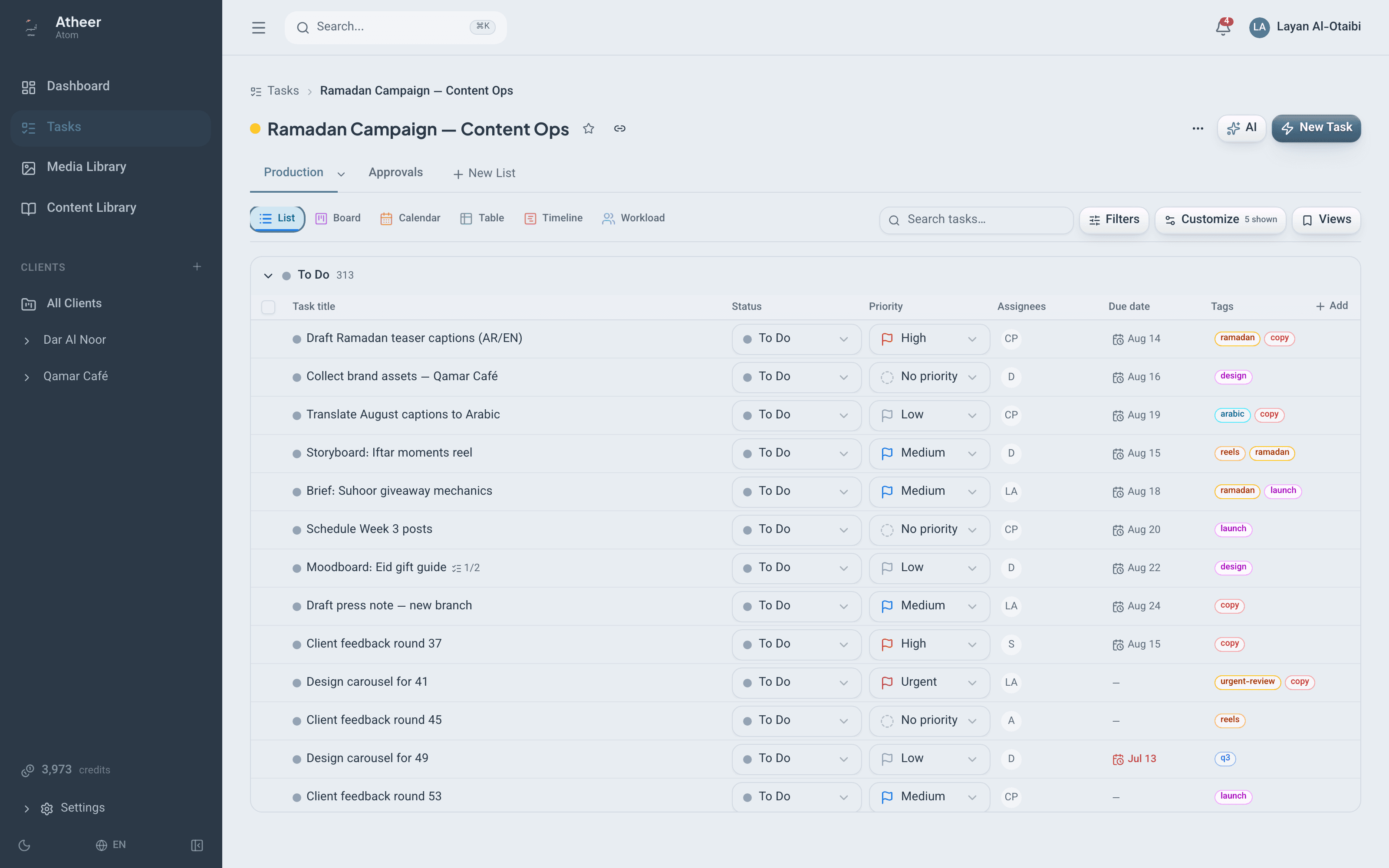
Seven views
Every view reads the same live data — switch between them without reloading, re-filtering, or exporting.
Fast at any size — smooth even at 10,000 tasks.
Drag and drop, with column limits, lanes by assignee or priority, and card covers.
Drag task chips between days, with the content schedule as an overlay.
Dependency arrows and milestones across the whole plan.
Every task and every field in one grid.
Who is carrying what, across the space.
Your own queue — plus a My Week planner and an Inbox.
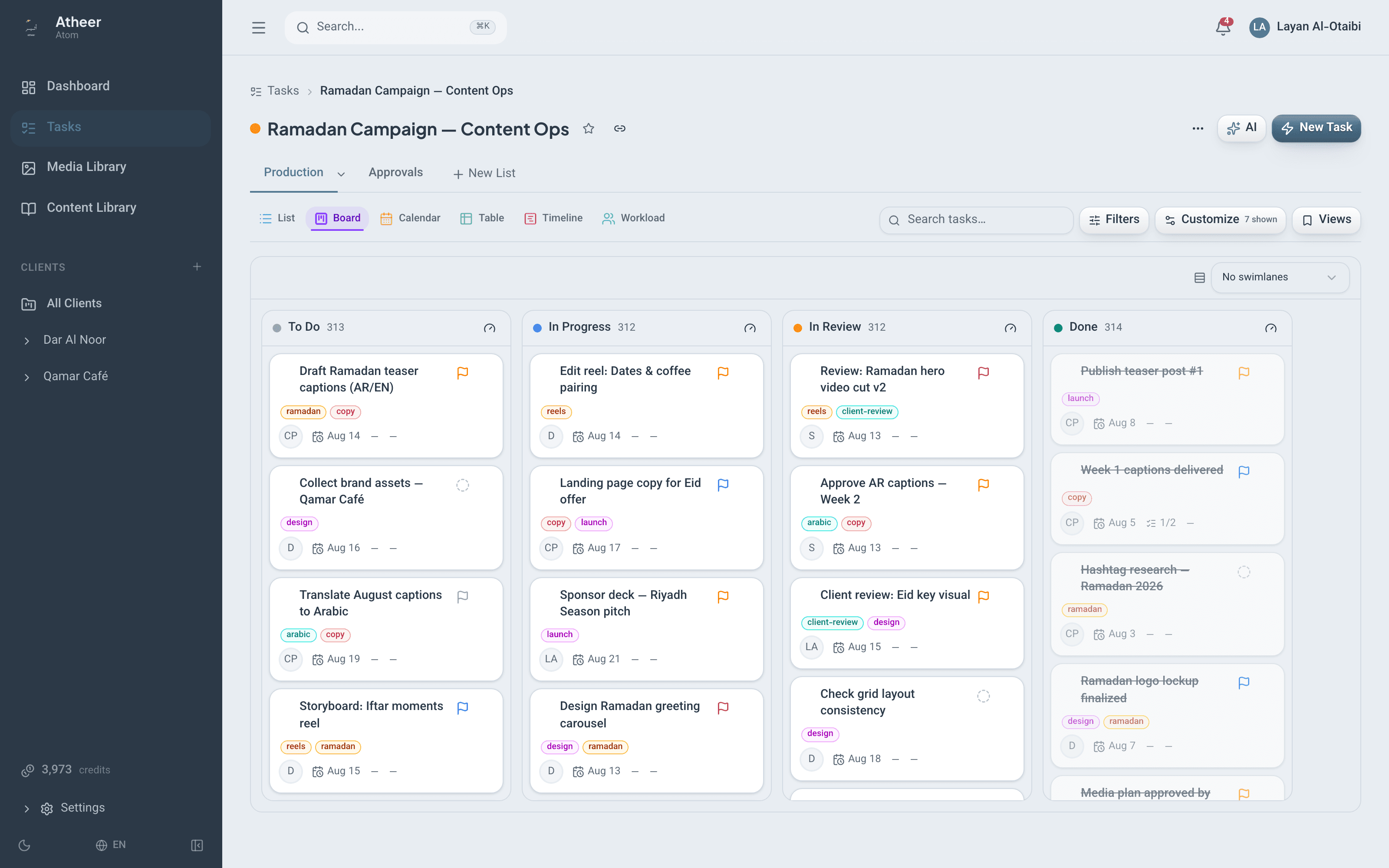
Any filtered view can be saved — personal by default, shared with everyone, protected, pinned, or set as the space default.
Built like a project tool
A space per client or team, lists with custom statuses, and tasks with everything a task needs — plus the details that separate a board from a system.
Each client or team gets a space with its own members and roles — Admin, Member, Viewer, Guest — and an optional monthly hours budget. Inside: lists with custom color-coded statuses, tasks, subtasks, and checklists.
Ten field types, defined per space, with labels in English and Arabic.
Blocking and waiting relationships, drawn on the timeline — and the platform refuses chains that go in circles.
Repeat on a schedule, and get reminded before dates arrive.
Rename, recolor, reorder, or hide them. Each type controls its shown fields, creation defaults, and icon — custom types on paid plans.
Status, assignees, dates, priority, estimates in hours, days, or weeks, tags, covers, attachments, and rich descriptions.
⌘K command palette, Q for quick add, 1–6 to switch views, ? for the cheat sheet.
Automations
A no-code builder with a simulate mode: see the run history and the next five fire times before anything touches a real task.
Triggers
Actions
On a schedule
“On the 15th of every month → create the monthly report checklist from a template.”
Every rule shows what it would have done — run history, plus the next five fire times.
Rules can’t trigger each other into a spiral.
On Professional and above, one rule can govern every space.
Time & retainers
Track hours where the work happens, and see them against the monthly budget you promised the client.
Start the clock from the task itself — or log the hours afterwards.
Give a space a monthly hours budget, and the retainer bar shows exactly where the month stands.
A weekly space report as CSV, plus a reports dashboard with a manager-only member table.
A sweep closes forgotten timers before they distort the numbers.
Collaboration
Comments, presence, and updates land instantly — and even on a weak connection, nothing runs more than 15 seconds behind.
AI, priced up front
Every action shows its credit price before it runs. Every result is a proposal you review — nothing is created silently, and failures never charge.
| Action | Credits |
|---|---|
| Brief → task plan | 30 |
| Meeting notes → tasks | 20 |
| Thread summary | 5 |
| Draft a task description | 3 |
| Fill with AI | 3 |
| Quick add in plain language (English or Arabic) | 1 |
| Arabic ↔ English translation | 1 |
Prices are shown before every run — and charged only on success.
Switching tools?
A migration you can preview, pause, and re-run. Re-runs never duplicate.
See exactly what will be created before anything is.
Live progress while you keep working — and it resumes from checkpoints if interrupted.
Re-running an import picks up where it left off. It never creates the same task twice.
Tasks, subtasks, comments, files, custom fields, and time entries all come across.
Outside the team
Guests, read-only links, and intake forms give clients and freelancers a way in, without opening the whole workspace.
Client contacts and freelancers join as Guests and see only the space they belong to.
Share a read-only view of a list with internal details hidden. Switch it off anytime — and reviewers on links use zero seats.
A form anyone can submit — and every submission becomes a task.
Atheer staff can never read task content — operational counts only.
Start with one space and one client — or import everything from ClickUp and keep the history.
Start your free 30-day trialNo card needed. Accounts are activated after a quick review.